You give the goal.It runs the tabs.
An AI agent that drives your real browser — your tabs, your sessions, your logged-in accounts — through any provider you choose. Describe a task in the side panel; TabRunner reads pages, clicks, types and navigates until the job is done.
Launch one — it throws a flock of comet-tabs across the sky, and nothing else. The real run needs the extension.
Runs on
- Chrome
- Brave
- Edge
- Arc
- Opera
- Vivaldi
Chromium only. Firefox and Safari have no trusted-input API, so they get an explanation, not a dead button.
TaskPull the latest invoice from my inbox into the expense report
simulated demoPlanning…
Esc stops any run for real — this one included, if it were real.
Your browser is the advantage
Most browser agents run in a sandboxed, logged-out browser. TabRunner runs in yours — so it can act on the sites you're actually logged into.
Signal path — one task, end to end
Two-way MCP
Claude Code, Claude Desktop or any MCP client can hand TabRunner a task — same browser, same logins, labelled in your history. And it dials out too: remote MCP servers' tools join every run behind the plan gate, and run events can POST to your own webhook.
No server. At all.
Your key goes straight from the extension to your provider. Configs and history live in chrome.storage on your device. No account, no telemetry, nothing to breach.
Bring your own provider
15 presets across the 12 providers below — Anthropic, OpenAI and Kimi appear twice: sign in with the Claude, ChatGPT or Kimi plan you already pay for, or paste an API key. Plus any endpoint speaking the OpenAI or Anthropic wire format. No lock-in, no relay.
- Anthropic
- OpenAI
- Kimi
- Z.ai
- Qwen
- DeepSeek
- Gemini
- OpenRouter
- Groq
- Mistral
- xAI
- Ollama
- + any OpenAI/Anthropic-compatible endpoint
Guardrails that hold
Consequential actions — paying, sending, deleting — ask for your confirmation first. Retries ride out provider hiccups, a step budget caps runaways, and Stop actually stops.
Real trusted input
Clicks and keystrokes go through the Chrome DevTools Protocol — genuine trusted events, not synthetic JS dispatches that login forms and payment fields ignore.
Sees the page, not the HTML
The model reads a compact accessibility tree, never raw markup — small prompts, stable refs, and passwords or card numbers that never leave the page.
[ref=e12] button "Submit"
[ref=e13] textbox "Email"
The panel is the product
Not a browser takeover — a side panel that works alongside the page you're on.
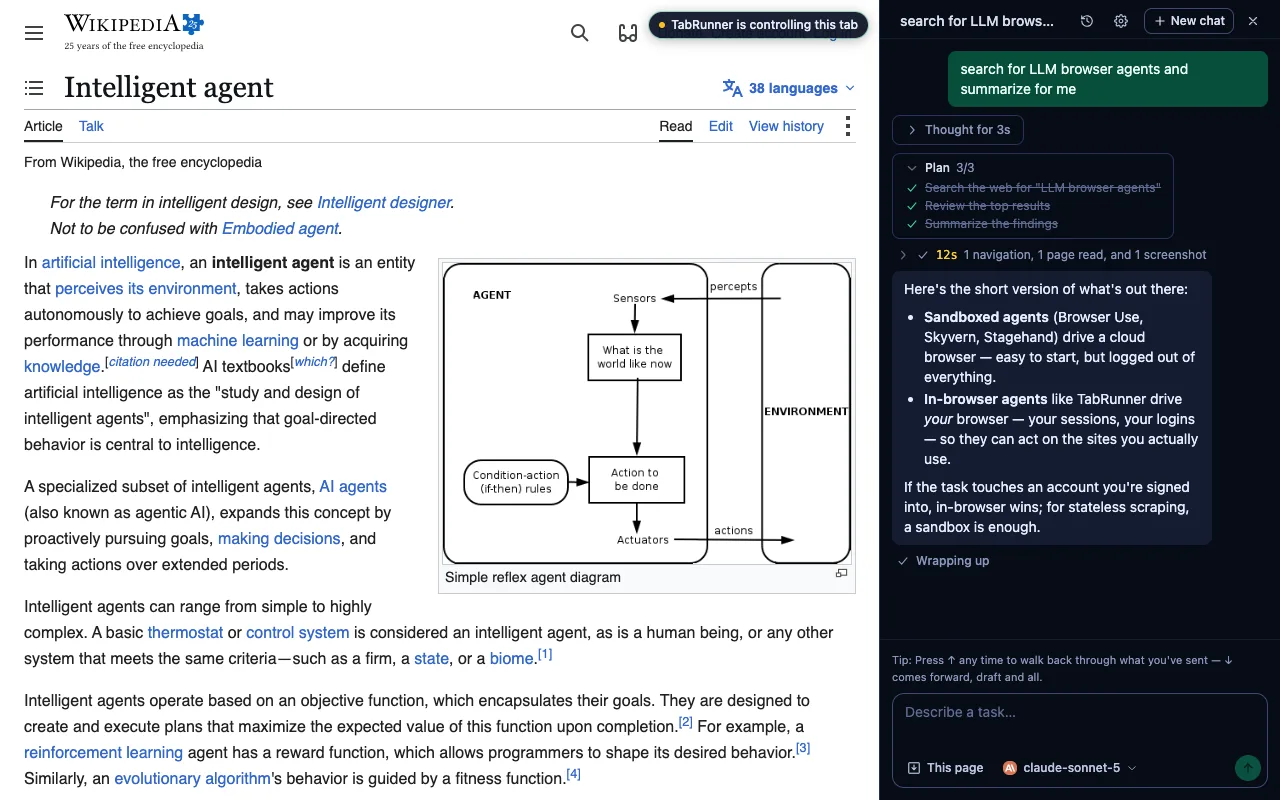
Screenshots from the current build — captured automatically, so they never lag a redesign.
The flight plan
One click from the Chrome Web Store, then a minute to point it at a provider. No account, nothing to sign up for.
Add it from the Chrome Web Store
auto-updates- 1
Add TabRunner to your browser from the store listing — updates arrive on their own from there.
- 2
Pin the comet to your toolbar and click it to open the side panel.
- 3
Pick a provider — sign in with a subscription you already pay for, or paste an API key — then describe a task.
Rather not use the store?
Download the ZIP and unzip it somewhere you'll keep it, then chrome://extensions → Developer mode → Load unpacked → select that folder. It can't sit alongside the store install.
Download ZIPUpdating
Extract each new ZIP over that same folder, replacing the files, then press ⟳ on chrome://extensions.
Never remove the extension to reinstall it — Chrome deletes its storage on the way out, and your providers, sign-ins and conversations go with it.
Said plainly
- Chromium desktop browsers only — Chrome, Brave, Edge, Arc, Opera, Vivaldi. Edge and Opera ask you to allow extensions from other stores first.
- The install prompt asks for wide access to your tabs. That access is the product — it's how the agent reads pages and types for real. What it does with it is the section below.
- You bring the model: a provider subscription you already pay for, or an API key. There's no TabRunner account and no free tier bundled in.
- Already running the unpacked build? Remove it first — the store version shares its extension ID and Chrome won't run both. Removing deletes its storage, so your providers, sign-ins and conversations don't carry over.
No ground station
An agent that drives your logged-in browser has to answer the data question first. Here it is.
- Data goes to exactly two places: the site the agent is working on, and the AI provider you configured.
- There is no TabRunner server, no account, no analytics, no third-party calls.
- Provider configs and conversation history live in chrome.storage, on your device.
Your browser
Your AI provider
API key or sign-in — direct
The sites you use
clicks & keystrokes
TabRunner server — doesn't exist